
TrueUI Frame Exporter
A lightweight Figma exporter that packages selected frames, assets, variables, and instructions into a cleaner handoff for LLMs and developers.
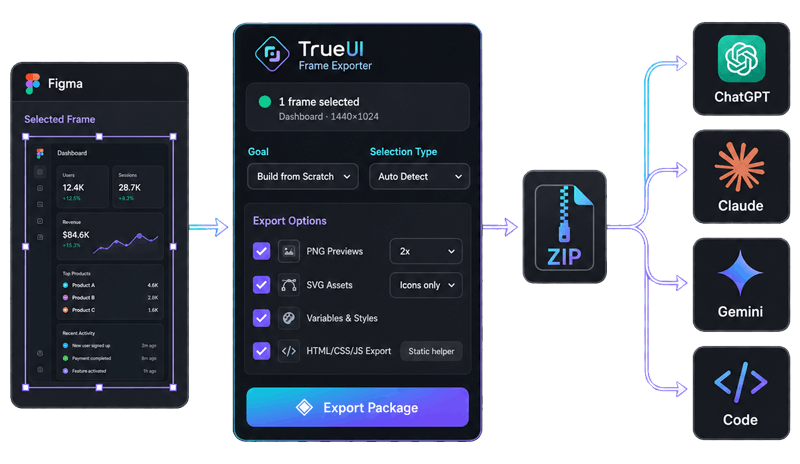
A small exporter with a clear job
Not a magic design-to-code button. Just a cleaner handoff.
Export the right selection
One frame, a full screen, or multiple frames and components.
Build a cleaner ZIP
Previews, JSON, SVG assets, prompts, and a real entry file.
Start with context
Helpful for ChatGPT, Claude, Cursor, Bolt, or a developer handoff.
What goes in the package?
Enough structure to reduce guessing.
export-root/
  START_HERE.md
  package-manifest.json
  task-prompt.md

  visual-reference/
    selected-frame@2x.png

  source-data/
    project.json
    variables.json
    components.json
    styles.json
    rendering-plan.json
    export-quality.json

  assets/
    svg/
      manifest.json
      icon-name.svg

  html-scaffold/
    index.html
    styles.css

  qa/
    visual-checklist.md
    known-risks.md
    update-mode.md
START_HERE.md
The entry point. It tells the model what to open first.
rendering-plan.json
Defines the goal, selection type, and implementation path.
visual-reference
PNG previews used as visual truth during implementation.
assets/svg
Real icons and vectors, exported with a manifest.
Choose the goal before export
The selected mode changes the prompt and handoff files.
Build from scratch
Generate a fresh implementation from the selected frame.
Patch existing UI
Keep the current codebase and focus on visual fixes.
Continue previous work
Send a newer export into an existing LLM conversation.
Audit only
Generate a review without building UI code.
Developer handoff
Package the selection for a human developer or coding agent.
How it works
A short workflow for a better handoff.
1. Select in Figma
Choose a frame, component set, or multiple frames.
2. Choose goal and type
Tell the exporter what kind of handoff you need.
3. Export package
Get the ZIP with references, assets, prompts, and QA files.
4. Upload to your LLM
Start from START_HERE.md and continue from there.
Useful when a screenshot isn't enough
Good for rebuilds, patches, audits, and cleaner developer handoff.
Rebuild a selected UI
Turn a frame into a fresh front-end starting point.
Update a plugin screen
Patch an existing UI without throwing away the codebase.
Handoff component variants
Export states, icons, and variables with more context.
Audit a design board
Review structure, naming, assets, and implementation risk.
Continue an LLM task
Attach a newer export without restarting from zero.
Give developers context
Share a cleaner package than a screenshot alone.
Frame Exporter FAQ
Short answers for the practical questions.
Not exactly. It creates a cleaner local handoff package for LLMs and developers. The HTML scaffold is a helper, not production code.
Yes. Export the ZIP, upload it, and ask the model to start from START_HERE.md.
Yes. It supports frames, component sets, variants, icon sets, and mixed selections.
It tells the model this is an update to existing work, not a brand new task.
A screenshot shows the look. The export adds structure, assets, instructions, and intent.
Better context in. Less guessing out.
Use Frame Exporter when you need a more reliable handoff from Figma into an LLM or developer workflow.