

Turn your Design system into a design engine.
Restyle captured pages, generate consistent UI, and scale your brand system across real product screens.
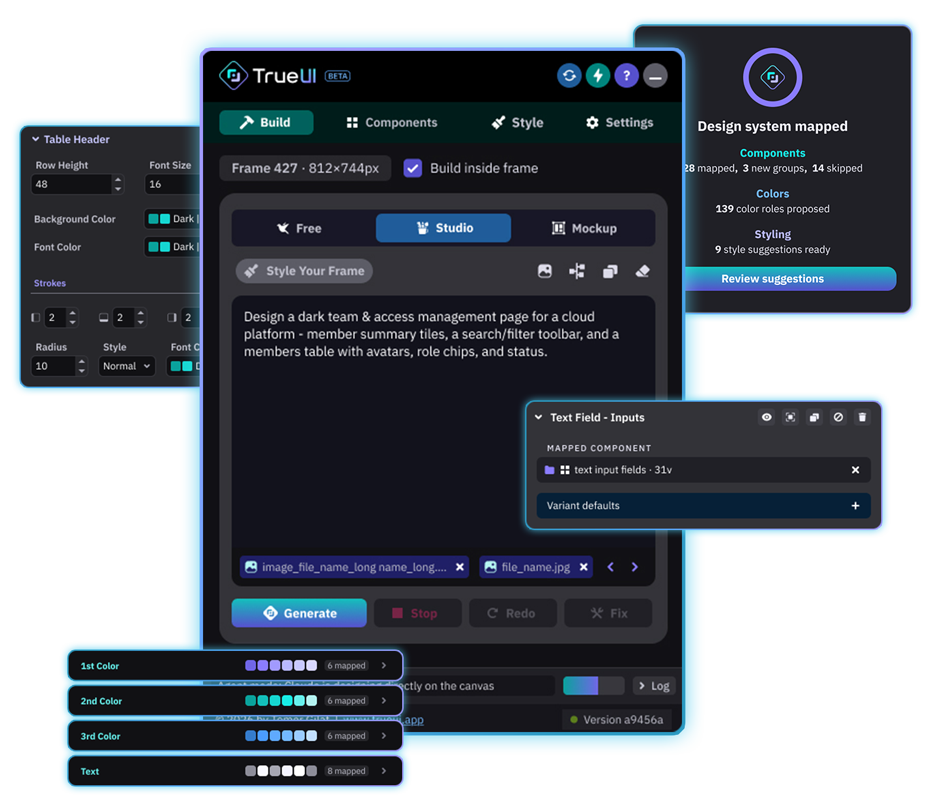
From Figma system to AI context.
TrueUI helps AI understand the system before it builds: the product context, the reusable UI patterns, the visual language, and the mapped decisions your team wants to keep.
Smart mapping
Use product context to suggest useful mappings for components, reusable patterns, styles, and system roles, then keep human review in control.
Style intelligence
Connect colors, typography, surfaces, borders, radius, and visual defaults for generation and frame restyling.
Composition support
Use real component structure and reusable product blocks instead of forcing every generated screen into flat placeholder layers.
Mapping Health
Review system readiness before generation, so setup gaps are easier to catch before they become canvas cleanup.
Workspace context
Work across connected Figma files, reuse setup decisions, and keep design-system context portable for teams.
Studio generation
Generate editable Figma screens from mapped system context, with focused Fix and Redo loops when the first result needs adjustment.
AI works better when it starts with system context.
Start with intent, then add system context. TrueUI maps the product system, reusable UI patterns, and visual rules the output should respect.
Prompt Intent
Describe the screen goal, users, content, density, and product scenario. The prompt gives direction for what should be created.
Mapped system context
TrueUI adds reviewed knowledge about components, variables, styles, icons, patterns, and team rules before generation starts.
Your design system becomes AI-ready context.
TrueUI turns setup work into reusable context. Once your system is mapped, future runs can start from the same product understanding instead of rebuilding context from zero.
Setup context
Add an industry and a short product description so Smart Map starts with product intent, not only file names.
Map
Let TrueUI suggest a setup across components, styles, icons, blocks, and patterns, then approve what matters.
Validate
Use Mapping Health to catch gaps and weak areas before they turn into repeated cleanup.
Reuse
Save and reuse mapping decisions across sessions, files, and team workflows.
Already have a frame? Style it with your system.
Use Style Your Frame on captured pages, imported layouts, rough AI outputs, or Free-mode explorations. TrueUI preserves the structure and aligns the frame to your mapped colors, typography, and container rules.
What it improves
Solid colors, typography, container styling, and frame names where possible. The goal is a system-aligned frame you can keep editing in Figma.
What it preserves
The original structure stays in place. It does not replace captured regions with real components or rebuild the full layout from scratch.
A guided setup before generation.
TrueUI is built for designers who want better AI output without giving up control. Add context, review the system setup, then generate focused screens from the mapped design system.
1. Connect
Add your Anthropic or OpenAI API key locally in Figma.
2. Describe
Choose an industry and describe the product briefly.
3. Map
Let Smart Map suggest the first useful setup.
4. Review
Approve important suggestions and check Mapping Health.
5. Generate
Create one focused screen from the mapped system.
6. Improve
Use Fix or Redo when the result needs a focused correction.
Build with system context from the start.
Give AI the design-system context it needs before asking it to build, or use that same context to restyle an existing Figma frame.
Frequently asked questions
TrueUI is a Figma plugin that makes your design system AI-ready. It maps system context first, then generates editable screens from that reviewed setup.
Because better AI output needs product context: components, variables, typography, icons, styles, reusable patterns, and the decisions your team already made.
Mapping means turning your Figma system into clear AI context: what should be used, how it should look, and which patterns matter for generated screens.
Yes. TrueUI is built for real Figma files, including mature systems, messy naming, shared libraries, custom product widgets, variables, icons, and reusable patterns.
Yes. TrueUI supports connected project workspaces and reusable setup so teams can work with more than one Figma source without treating every file as isolated.
Mapping Health reviews whether the system setup is ready enough for generation. It helps catch important gaps before they become repeated cleanup work.
Yes. TrueUI can help map colors, variables, typography, surfaces, borders, states, and common style defaults so generation has a stronger visual context.
Studio is the professional generation mode. It uses the mapped design-system context to create editable Figma screens that stay closer to your real product UI.
No. TrueUI creates controlled starting points. Product designers still review hierarchy, interaction logic, density, content, edge cases, and final product decisions.
TrueUI is strongest for product designers, design-system teams, and product teams with real Figma systems where consistency, governance, dark mode, and reusable UI rules matter.